> ## Documentation Index
> Fetch the complete documentation index at: https://docs.tigyai.com/llms.txt
> Use this file to discover all available pages before exploring further.
# HTTP API
> Create REST API tools that your AI agent can invoke during conversations to integrate with external systems.
HTTP API tools let your agent call REST endpoints during a conversation based on the node prompt and tool definition.
## What is an HTTP API Tool?
An HTTP API Tool is a REST API definition that the LLM can invoke at runtime.
**Typical use cases:**
* Call your own backend endpoints
* Trigger n8n automations
* Sync data with a CRM
* Fetch data from external APIs (weather, pricing, availability, etc.)
* Write/update/read data using Rest API
**The LLM decides:**
* which tool to call
* when to call it
* what parameters to send
**All based on:**
* Your prompts: node-level instructions in simple english (or any language)
* Tool name
* Tool description
* Parameter definitions
## Defining an HTTP API Tool
### 1. Tool Name
* Must be clear and action-oriented.
* **Examples:** `capture_lead_interest`, `fetch_weather`, 'create\_crm\_contact', etc
### 2. Tool Description
* Extremely important
* This is how the LLM decides **when** to use the tool.
* Write it in plain, explicit English.
**Bad:**
"API to capture data"
**Good:**
"This tool is to capture interest. Use this tool when the user clearly expresses interest in the product or wants to be contacted"
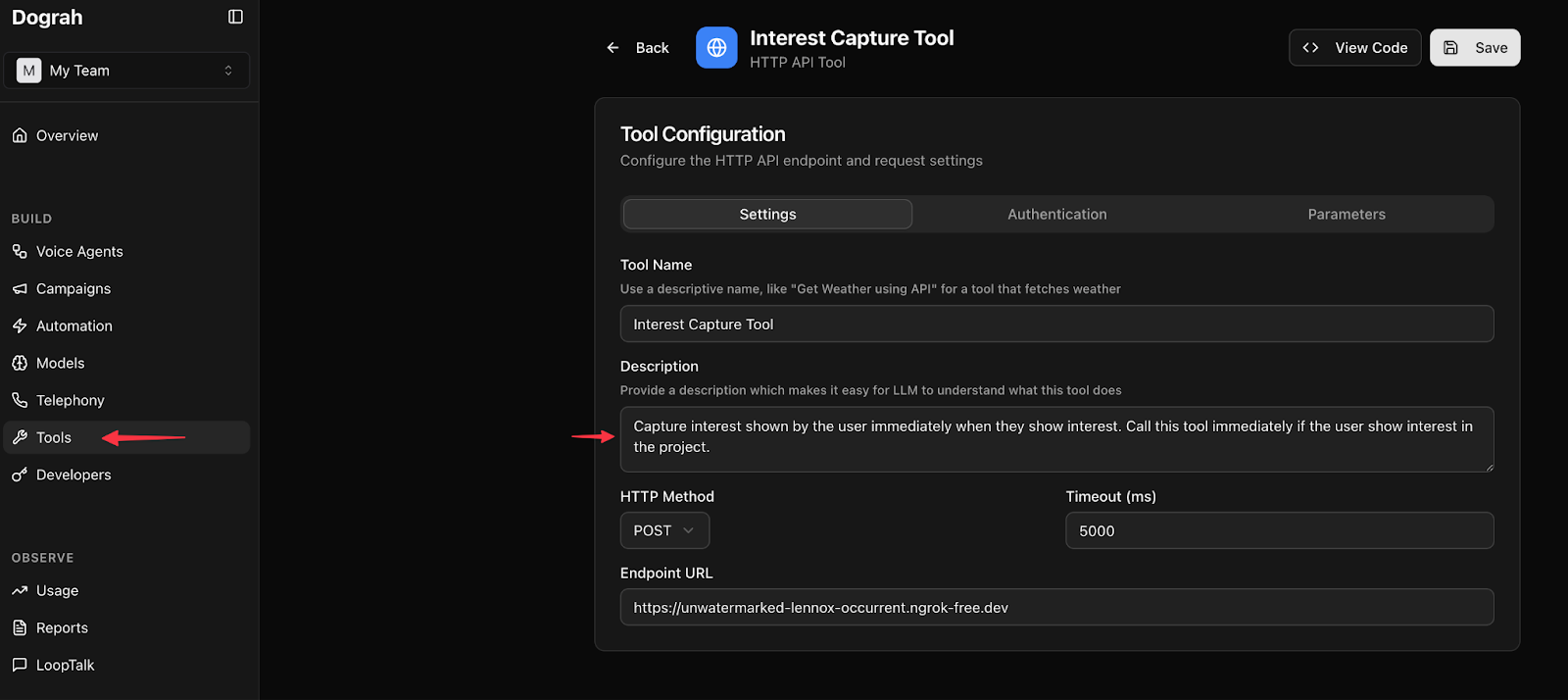 ### 3. Endpoint Configuration
* Full URL (**must include `http://` or `https://`**)
* Supports **REST** methods
Common mistake: forgetting https\:// in the URL.
### 3. Endpoint Configuration
* Full URL (**must include `http://` or `https://`**)
* Supports **REST** methods
Common mistake: forgetting https\:// in the URL.
### 4. Authentication & Headers
* Add custom authentication
* Add custom headers
* Works with internal services and third-party APIs
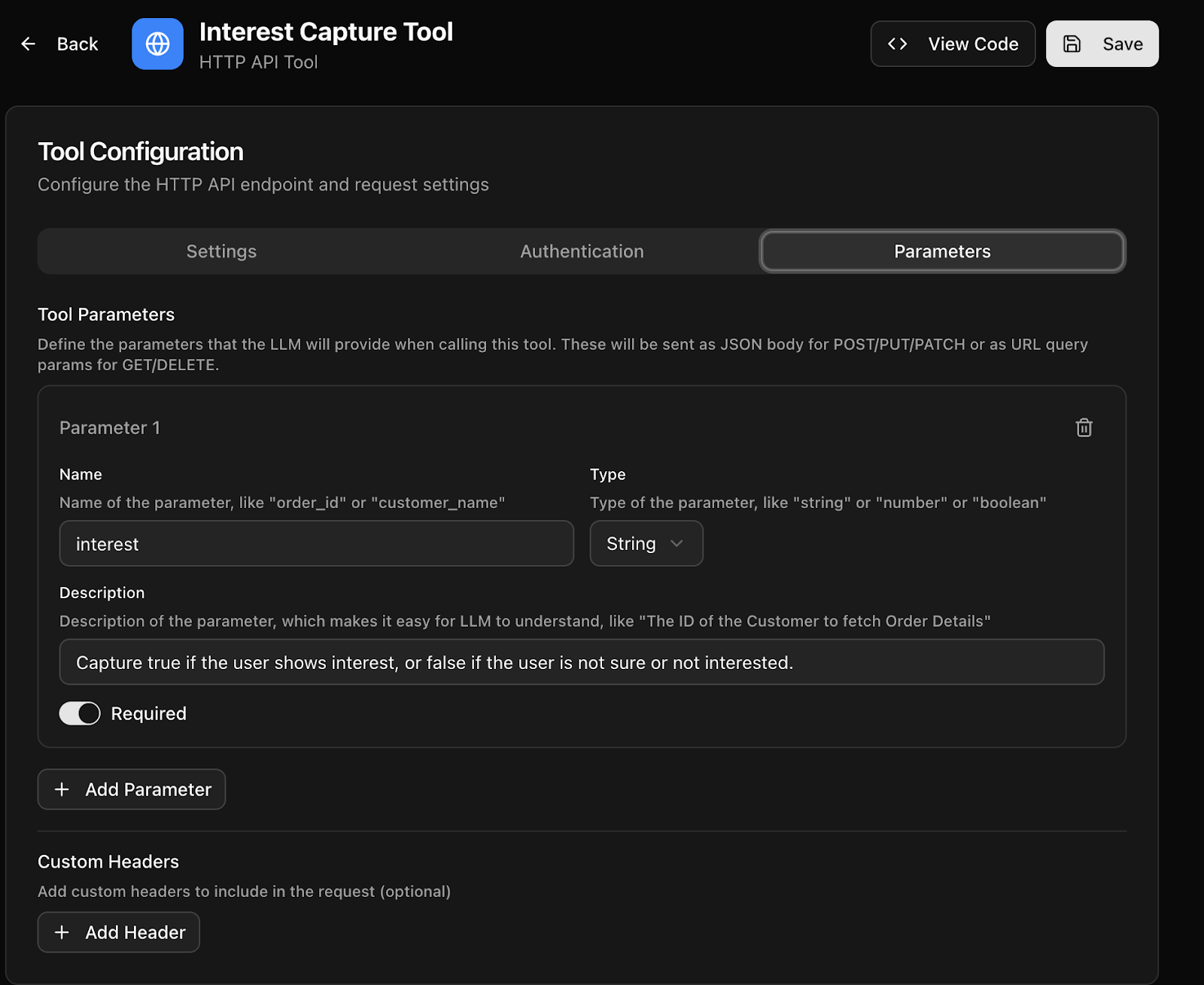
### 5. Parameters
Each parameter must have:
* Name
* Type
* Description
* Required/Optional flag
**Parameter descriptions matter more than types.**
Guidelines:
* Start with string parameters when possible
* Be explicit in what the value represents
* Mark only truly mandatory fields as required
Example:
* interest (string):
"Set to true if the user clearly shows intent to buy or wants follow-up. Otherwise false."
## Attaching Tools to Workflow Nodes
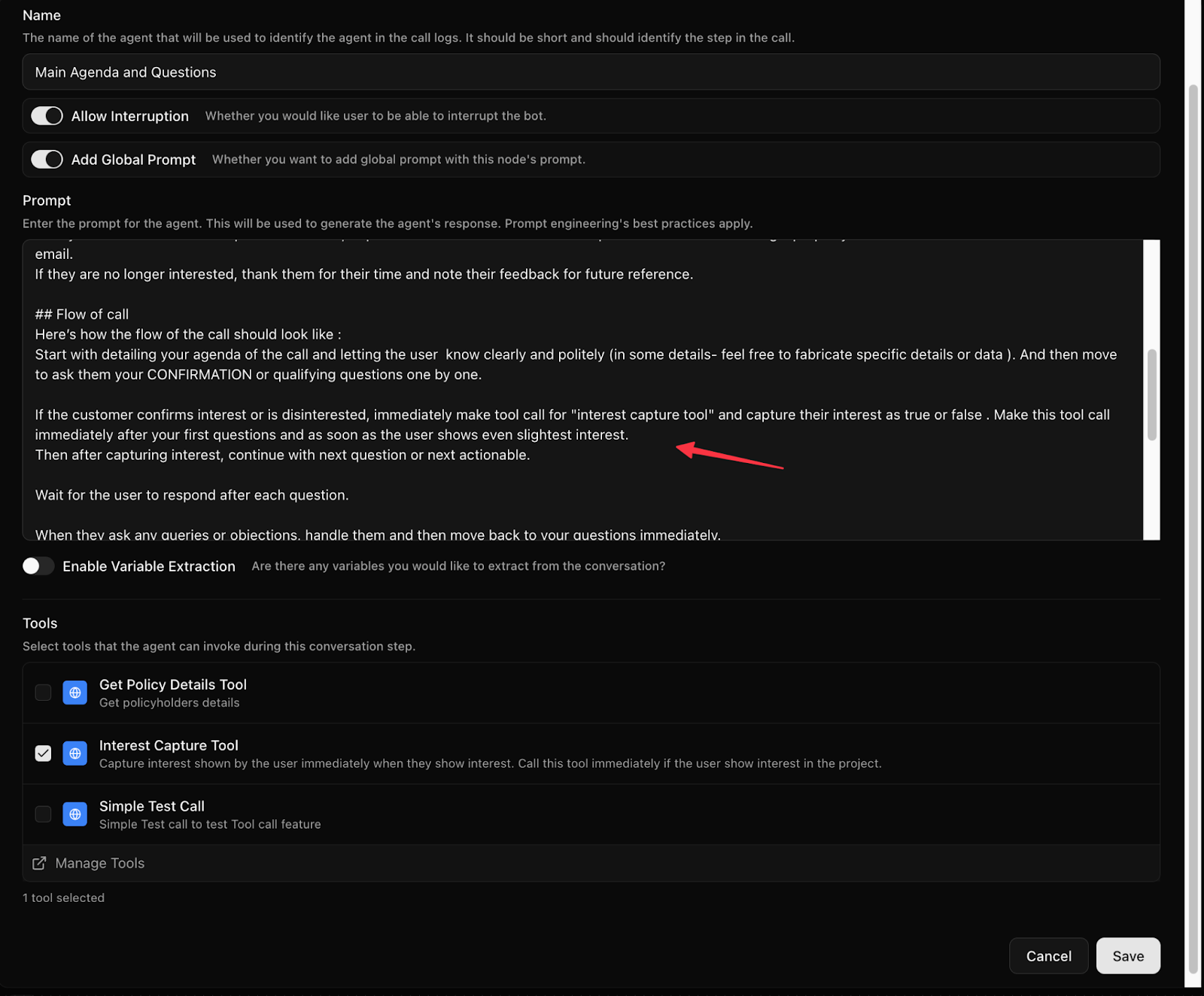
* You can attach **multiple tools to a single node**
* All the tools that you have created will be available for selection in the node
* Tools are only callable when attached to that node
* The LLM will choose which one to call
Inside the node, guide the LLM using **simple English instructions**.
Example:
"If the user shows interest in speaking to sales or wants a callback, immediately call the capture\_lead\_interest tool and set interest to true."
This instruction is often the deciding factor for correct tool usage.
This instruction is often the **deciding factor** for correct tool usage.
## Tool Invocation Logic (How the LLM Thinks)
The LLM considers:
* User's spoken intent
* Node prompt instructions
* Tool name and description
* Parameter descriptions
If these align clearly, the tool is called automatically.
Poor naming or vague descriptions lead to:
* Missed tool calls
* Wrong parameters
* Hallucinated values
## Key Best Practices
* Name tools clearly
* Write detailed, action-based descriptions
* Keep parameters simple at first
* Always include http/https in URLs
* Use plain English in node instructions
* Attach only relevant tools to each node
**Well-defined tools + clear prompts = reliable, production-grade voice agents.**